
LawMate PV-PB30W Power Bank Wi-Fi DVR
The next bit of kit I want to review is another offering from the Lawmate stable. Most of us will have used Lawmate kit in various guises at one stage or another and with no real competition out there, Lawmate have pretty much cornered the market. In my experience a lot of their offerings although good in design, leave a lot to be desired when it comes to reliability. For this reason I always have at least one but usually two other options in my grab bag as back up if one device lets me down.
I was advised to try the latest “Powerbank” covert camera from Lawmate by a guy who I regularly work with who swore by not only it’s image quality and features but most importantly it’s reliability. The model in question being the LawMate PV-PB30W Power Bank Wi-Fi DVR. Not to be confused with the previous model LawMate PV-PB20i USB Power Bank DVR which I did try but the image quality was inferior and was slower to start recording which means you could lose out on vital footage and so I resigned it as not fit for purpose.
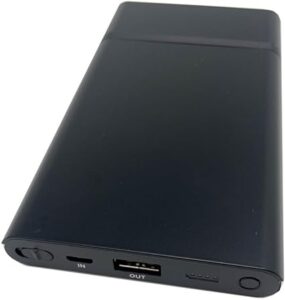
I took delivery of the LawMate PV-PB30W Power Bank Wi-Fi DVR which arrived in its usual Lawmate packaging and accessories including iPhone lightning and USB-C cables to connect to your phone (Yes it actually does function as a working power bank for when you get caught short on phone battery power). The unit is very slim. On the bottom is a sliding on/off switch. Be aware, once switched on it will start recording. This can be seen as a good thing or not depending how you look at it but for me I grew to like it, as any shaky start-up footage can be edited out in image editing software. Next to this is a mini USB socket for charging the unit. This is much more preferable to the unique charging port utilised on the Lawmate PV900 Evo that requires a specific cable that is prone to break (I have got through two) and you can only buy replacements from Lawmate direct.
Charge times are also much quicker than the PV900. Next to this is a USB port for connecting to your phone when using as or disguised as an actual power bank. Next to this are four LED lights which display how much battery power remains. These stay unlit until you click the button to the right and then you will get an indication of how much battery is left. One Led is very low and near depleted, two is low, three has decent life and four equates to a full or near full battery.
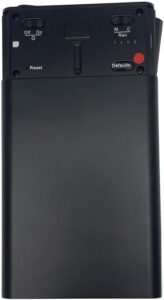
On the back is a removable cover which you clip off with your fingers which displays some more functions. From top left to bottom right, firstly there is an on/off sliding switch this is for Wi-Fi on or off. I decided to leave it on as then I can decide whether to point and shoot or use the Wi-Fi facility on my phone without any faffing around operating switches and making for untidy video footage. The Wi-Fi utilises the familiar PV Cam Viewer app which most of you will be familiar with. To the right of this is another sliding switch with lettering M & C REC this is for motion detection recording M being Motion and C being continuous. I have to hold my hands up here and admit when I initially tried this I nearly wrote the device off as I kept experiencing intermittent recording. On closer inspection I noticed I had the switch set to motion!
Underneath is a reset switch and to the right of that is a default switch. Both no doubt pretty much having the same effect. To the left of this is a micro SD slot. For me this is a welcome feature which the PV900 lacked as that recorded onto its own internal memory. The card can take up to 64gb which should be more than ample for a days work. I’m much more comfortable handing over an SD card at stand down as it makes for better evidence retention especially if you are keeping a log of the evidence handling.
In use
I have been using this device for a few months now and as previously mentioned apart from my own error having it switched to motion detection rather than continuous recording, I have learned to trust this device. It is very near the size of my iPhone, so when I use it, I either hold it as if it is a phone or if using the Wi-Fi to view when standing, I slip it under the phone and it looks very natural, with it being so slim no one takes any notice of it. If sat at a table you can use it just like any of the other Lawmate Wi-Fi devices, sat on its own and view on your phone, no need for you to be sat facing your subject and giving your subject a free look at you. People remember faces, they don’t remember backs of heads.
A couple of weeks ago I really put it through it’s paces. on a surveillance in Coventry city centre I switched the unit on and left it on for the entire foot follow, Wi-Fi switched on, and long spells of recording over five hours. I am happy to say the unit performed without a glitch. The only thing that got glitchy was the PV viewer app now and again going distorted but a reboot of the app sorted that. On reviewing saved footage all was well. Towards the end I did have a couple of fluctuations of the battery display losing one segment and then back to full in the display but at stand down it was showing full in the app display and full in the manual display on the device. When I charged it in this state it did start off displaying three quarters full and fully charged in about half an hour. Lawmate in their blurb boast 600 minutes with Wi-Fi off so to get this amount of time with Wi-Fi on, I was most impressed.
The image quality is exactly the same as a PV900 EVO (Not the poor quality of the old PV900) I also hated that horrible yellow time date stamp that the older Lawmate had, so I was happy to see this had the same better white TDS embedded onto the recordings. I can thoroughly recommend this device, I only publish reviews on products I am happy to use myself and this is one of them. For more information with full specifications or to purchase head over to Dan’s on line shop. Dan is a surveillance operative himself and only sells to trade. Cost at this time is £279.99

Ease of use. 
Versatilty. 
Price.
Recommended.